Showing posts with label web design. Show all posts

Wednesday, 28 January 2009

The 21st Century Preston Family

Well, Christmas is over, the New Year has come and gone and we can begin trying to move on to more work in the website. Well, I say "we" but the truth is still that it is just poor old me, though there are rather more people who have become involved over the last few weeks and by the look of things may well be more to come. Our new members have all joined the Family Journal side of the site rather than anything else but let's face facts - the records are what really matter to pretty much every one of us! New members, though, have raised one or two issues that are relevant to our family in the 21st century and the way we can work together to help each other.

Applications and solutions

First off, there have been questions from one of our new members about the structure of the website and how it works to provide facilities we can all use. This takes us into the peculiar world of computerised solutions and applications and how they differ from each other - a matter of vanishingly small importance to most of us except in the way that it affects how we can use the website. To begin with, let's try a couple of simple definitions and work from there:-

An application is a set of tools that all work together as part of a single package that can be delivered to customers or users as one off-the-shelf package. Nice and easy - as long as you want everything in the application package and it has everything that you want to use.

A solution is a set of things that might be produced by different people for different uses that can still all be put together so that they deliver what you want to use. The snag with them is that they don't come in one neat bundle but instead have to be put together so that everything that is needed is collected into one place and all hooked up to the other bits of the solution.

Our website is not an application - it is a solution that is made up of several different websites that provide special services that are useful for our family site.

Truth and consequences

Two obvious questions - at least, they seem to be obvious because several people have asked them recently - that arise because of the structure of the site are:-
  • What are the applications in our website?
  • What does it mean for users?
Taking each in turn, let's take a look at the structure of the site, then what it means to us as users. After that we can have a quick look at the disadvantages of our site solution and finally wind up with the advantages that it offers. Most of the points have been covered before in one way or another but, since I have been asked about them, I am quite happy to go over them again.

Bits of the jigsaw

To begin with, there is the site itself - and this one is easy. I own and run a full internet domain (a place to store web pages and other things) which offers me the address "www.mpreston.demon.co.uk". Most of you will recognise this as a simple domain offered for free by my Internet Service Provider - Demon Internet - which I can use for my own pages. That is where the main pages sit and is used for hooking together the different sites used in our family pages solution.

Next up comes the Journal - the pages that you are reading - which is used just for keeping people in touch with developments and to inform everyone of what has been done, what is planned and what is currently under way. This is not provided by Demon Internet and is actually just the Blogger service provided by Google. Since it is not a part of the same company as the main page, it needs members to create an account (free, of course) in order to join in - though thankfully Blogger does allow us to add comments and join in discussions in the Journal even if we have not got accounts with Blogger.

So far, so good - we can use the website solution without actually needing to set up any accounts at all. Nice and easy to use, nice and easy to take a full part in and nice and easy to keep in touch with others using the site. There are even facilities to allow you to "follow" the blog posts so that you can be regularly updated on what happens in the site as a whole - though you can also follow the Journal without actually setting yourself up as a "follower".

Finally - so far - we have the Family Records and it is here that we have a different situation that does require you to join the site. This part of our solution, provided by Wikispaces, is a wiki - like the much better known Wikipedia site - so that we can all add, change and even remove entries in the records. When it comes right down to it, this is the main part of the site and the one where I expect to build up a very large number of pages - there are already more than 250 of them there - so that we can collect and keep up to date the full details of our family over the centuries.

Like most wiki sites, this does need members to join and set up an account before they are allowed to make any changes. In fact, the restrictions on the records are slightly more strict than the service provider insists on so that we can be a little more sure that people will not deface or corrupt our records - and that if they do they can be quickly removed from the site altogether!

Copyright and licensing

To be certain that all of our different components are allowed to work together and that any information on them is protected and legally safe, most of the parts are made up from open source software and are offered as open source products that can be linked together without breaking proprietary licence conditions. One issue that could cause a problem is the use of copyright on the content of the sites since they may be in different legal jurisdictions and be controlled under different versions of copyright law.

Thankfully, there are several open source copyright solutions out there and these have now been tested in a number of courts around the world, the most contentious of which is likely to be in the USA and even this has been tested and found to be fully enforceable. Links to details of how open source affects and is affected by copyright law in this paragraph point to a report on the testing of this matter in US courts for this very reason.

Of the various open source copyright - also known as "copyleft" - conditions that can be applied to information such as we record on the family site, I have chosen to put in place the Creative Commons licence to apply to the site. At the moment, this is only applied to the main site and to the wiki where we keep records of family members and even there we have not yet made it clear that it does apply by posting a link to the license on each page - but I shall do that as a matter of urgency, I promise!

Downsides and upsides

Obviously there is a major disadvantage to this sort of solution - you need an account on each part of it that requires an account and they can be different for each part. Wherever possible, users should do their damnedest to mitigate this problem by using the OpenID service (also a part of the site solution) so that a single logon can be used for all the different parts. Much less easy to deal with is the fact that each part of the site needs its own development of a standard "look and feel" - which still has to match as closely as possible the rest of the site.

On the bright side, that last disadvantage just means that poor old me gets more work - for you, as users, it should be pretty easy to find your way around and will even help you to recognise which part of the solution site you are using!

The major advantage, of course, is that if another feature is needed then it can be added without disrupting the rest of the site - and here, dear readers, we come to the crux of this posting. I have been asked by a number of site readers if it would be possible to add a forum - a place where we can post questions, answers, queries about the site, genealogy information not yet ready for the Family Records and so on. In fact, a place where we can generally keep in touch with each other.

As yet, I have not really begun to look for a way to add this to our site solution, but will be doing so over the next month or two (even though I have still got to change the main page for the site - so much work to do, so little time to do it!). I hope that this will be useful to users but there will inevitably be a downside to it - you will need to register an account with the forum provider as well as with the other parts of the site.

To make it easier to remember these passwords and account details, it is now clear that the best browser to use to view the site will be Mozilla Firefox and I shall also be adding this recommendation to the main site as well over the next few weeks. Other browsers will work, of course, but Firefox is well-known for its many ease-of-use features, a major one of which is its Password Manager to help you with exactly this sort of site.

Well, in the hope that this will answer the several questions I have had about the site structure and plans for the immediate future, I shall now ride off into the sunset and plan the next changes to be made. Perhaps by this time next month, we will have new features on the site... but more likely it will be April before they are in place.

Saturday, 30 August 2008

Spreading the News

For the last few weeks, here in the UK, there has been a strange annual event that takes place every year - teachers such as myself start to sit down and plan all the changes they will be putting into classes over the next year.

Its one of the odd things in life that people who don't work as teachers get the impression these changes and the planning that goes with them just sort of "happens" and really teachers sit around all day doing nothing until the students sit down in class.

Trust me - nothing could be further from the truth!

Teachers, as a rule, work harder outside the class than when they are in front of one. They most certainly work a great deal longer and many, many more hours tucked away in quiet corners than they do in front of the people they are actually teaching.

Here in the UK, the new academic year starts off in September, so the bulk of the work and planning for the whole year has to be done in August. Since that also tends to be the only time teachers can really take holidays and happens to be time I wanted to spend doing a lot of work on the family site, something obviously has to give.

So much to do, so little time

Among all the other pressures on my time, I have managed to complete the base design for a set of family records on the portion of the site that stores, searches and displays the family information. Granted, though - I have been working on that design for a good three months and doing the peculiar and, people have often told me, almost magical kind of maths that we database professionals do for a living. Yes, dear reader, its true - before I became a teacher I spent an entire career as a professional geek!

To keep things simple, I used my own little section of the family because it fits very nicely and very simply into a century group - organising families by century is the basic unit in the family records. It also happens to have very few complexities and generations to show thanks to some unfortunate problems that my ancestor, George Preston, had in his life. This meant that his only surviving child was my own ancestor, Roy Preston, and he only had three children - all sons - making the family tree for that century very simple indeed.

Building help files

I have used that century of information to put together the start of the family records and at the same time to put together a set of initial Help files to show how family records should be set up for recording in the family database.

There is obviously much more yet to do since this set of records should be as complete as they can be and so needs me to add a personal history - what each person did in their life and where they lived, worked and so on - so that the whole set can be properly linked. That, of course, is exactly what I have not been able to do thanks to the traditional "teacher rush" during August.

Plans and schemes

At this point, then, we have a simple set of files to help you build up your own family records. We have a simple set of family records for one family in the 20th century. We have an outline of how you should take care about personal data in the family records and avoid letting identity thieves make use of it. All of this is done - but there is much more to do next month and the month after.

To begin with, the time has clearly come for me to look around and find other groups and sites on the internet that are involved with the Preston family. I shall be doing that next month even if it means I can't do any other work on the site at all. It is, after all, one of the most important parts of this whole project.

I shall be making a special effort to contact the Preston families out there in Alaska that have had me puzzled for the past few months as well. Who knows, maybe I will actually find them.

There is also a group of us out in New Zealand - descended, I believe, from Captain James Preston - who I would like to get in touch with so I shall be looking for them too.

September, then, bids fair to be a very difficult and busy month but I shall try to get the Journal entries done as well and to keep you all in touch with what is going on - just so long as you all do your share and read the Journal! Yes, I noticed that you had stopped reading the pages: I regularly use a set of web tools to see who is reading the pages, where they are, how long they stay on the site, what they click, what they do, where they come from and where they go to after my page. It is tools like this that should help me make sure the site is doing the job it is intended for. I may even spend time - when I get time again - to write up details of the tools that I use so that you can use them for your own sites.

But that will be another story for another time.

Sunday, 13 July 2008

First Family Page

I've been spending so much time working out how to record family details I've had very little for the Journal. In fact, I've spent more time making them easy to store and search than doing the records themselves! After a lot of work, I've sorted out a method and made notes to remind me while I got down to the hardest bit.

Slogging through the "Help Pages" of the wiki site I've been finding out how to easily manage space, create templates, use fancy editing features and all the bits of otherwise useless information to make life easier for once I have it all in place. It was almost a welcome break to settle down and link the different pages together so we have one single site for everything!

House Preston pages

As you can see from the picture at the top, the main page is updated and links to the various bitsin use all tied together in one place.... you know, when I started all this, I was sure it was going to be easier!

Anyway, its all done now and we can - I hope - start to see people using the set of sites to investigate the family and to record their own genealogy information for us all to see. There is to be some concern about putting details on-line, but I hope the Help Pages included in the records offer some fairly explicit advice.

I've had a couple of questions about the Creative Commons licence used for the pages - and some asking why I've not included it on all the pages. Since the second question is easiest, I start there and then explain the reason for the licence itself.

What it comes down to is simple - some sites, and Google, which runs these blog pages, is a particular example of it - have their own licence agreements written into the permissions to use the features they offer. These can and sometimes do mean that the Creative Commons can't be added to the site without permission and that is precisely why they currently don't have the licence added: I don't yet know if I am allowed to.

As to the licence itself, it is what is known as a "copyleft licence" (rather than a copyright licence). It works pretty much, but not quite, the same way as normal copyright, but means you don't need to get in touch with me to use bits unless you are intending to do what is not allowed - in the case of these sites, that means sell it, steal it or keep it private. Pretty much anything else goes.

Journal readers

Unfortunately, all this has meant that the journal readership has dropped like a stone! Over the last month, it hit the skids with very few visitors dropping by - and all of them from the UK, which is also a big change. We seem to have lost our Australian and New Zealand readers and since I asked them to get in touch there has been no response and no connection from our once regular reader from Alaska.

Of course, I blame myself, and will also blame myself if it doesn't improve, since I will be getting ready for the next year's courses over the next month as well. I will make every effort to get the August posting done and posted though knowing me I will either forget to do it or will write it and forget to post it - I do get forgetful at this time of year! It does, however, explain why very few bothered with the latest poll, so I will just remove it and leave the page as it is for now.

All I need now to make the last month complete is for someone to tell me the Alaskan reader is that idiot Sarah Palin and my misery will be complete.

Tuesday, 10 June 2008

Over-reaching Ambition

Last time I set this site up, I made mistakes; I wasn't ambitious enough. I thought a simple blog to help people make their own sites and blogswould be good enough. It wasn't, and I should have known it wouldn't be. This time, I hope to avoid that mistake and provide more for us all.

Back then, the main page was just for the regular and unchanging stuff. I thought people would link their own pages to the main site but they didn't - many couldn't do it because I hadn't provided features for it. In short, I was missing things people would need.

Don't get me wrong - I had planned to put them into the pages, I just never got round to it. I wanted everything perfect first time - which it never is - but this time I hope to avoid that mistake, start simple and add features as the pages grow.

What is different

The new site began with design - covered in Doing Design and Page Design Software. That meant the blog - where the design was made - came first. Everything else, though it is already under way, will be added later. Now I want to add the main core of the site: the home page site. This will arrive in a basic form and be added to as additional features come on-stream.

This time, I will not expect perfection right away, though the Family Records will also come on-stream at the same time. Incidentally, if any of you are already using the records, I would be fascinated to know why it is mostly people from Australia who are using it.

What comes next

The main page has several sections. In the middle is the main information, with a headline for the "big story" and two smaller ones with smaller stories. Each will - but not yet - link to a detailed page for each of the three main subjects. Below that is a section that can hold several other items if they are needed. All of this gives me a way to show what is going on at the moment.

On both the right and the left is a smaller column, like the one to the right of the blog page. Both are for additional items and are where you come in.

What can I do?

I have my own ideas for those two columns, but the point of a family site is that it should be for the family and not just me. Thanks to Google Analytics I know we get six to eight visitors each day so if everyone pops in twice a month almost a hundred people read each posting (Ed: Analytics puts the actual figure at 91). We have a fairly high readership and hopefully most are members of the broader House.

So I would be foolish not to ask what you want to see in those two columns. It may be a risk, since last time I ran a poll I got a very odd vote from one and mixed responses from the others, but I really have to ask, especially now we are moving up Google search rankings. If you think the poll doesn't offer enough choice, please send a comment - I'll read them all!

On the right is a short poll for your opinion what to put in those columns. Please take a few moments to cast your vote. Feel free to send a comment to explain, expand, instead of, or as well as your vote.

Last word

One final thing: it has me curious and really isn't something I can ask anywhere else.

In the wilds of Alaska we seem to have at least one reader. Now, I know the family sent quite a few to the colonies during the British Empire and there are lots of us all over the world, but so far I don't know of any out in Alaska. I would appreciate it if our Alaskan reader would send a comment or email to let me know about the family out there in the snows - and I am sure others would be interested too!

Saturday, 24 May 2008

National Archives Update

I've been contacted by a nice person from the UK National Archives about changes - which may be welcome, since there are reports of problems using the site. The Archive is maintained on our behalf, with all we could need to know about our country, history and families - if you can find what you need!

As someone who is teaching genealogy to new enthusiasts, I am often asked about the Archives and see the shock and horror as users realise how difficult it is, so I am at the front of the queue admitting changes are overdue. Let's be honest; the Archive is huge and no matter how hard you try, huge amounts of information will always take a lot of organising and sorting if you want to find stuff.

Its hard to make something like the Archive easy to use and work done over the years is - for all its flaws - a magnificent effort on our behalf. I want to look at the site and show how you can use it - perhaps not easily - to find the sort of information that may be useful. The obvious place to begin, of course, is right where the links above take us: the main page.

Using the National Archive

Start at the top left. There is a "Family History" section with a nice little picture of a family group. A block below has a similar, but uniformed, group and deals with Military History, which is also useful for research.

Far too many spot the "Search" box and immediately try to find what they want - its like going to the reading room of the British Library and expecting the chap at the third desk from the right to pass you a copy of Radio Times from 1963 so you can check what time the first episode of Doctor Who started! Nice idea, maybe, but its never going to work.

Use the sections - click on "Getting Started" and it will help you use the site and find your way around. Sections advise on collecting information from home and family as well as features and data in the archives - and links to archived records.

Searching Archives

Most people make the error of immediately leaping into census records - understandable, but a mistake all the same. First find birth certificates, marriage details and death records of people you already know about. All those are offered by the archives and links in the introduction section. Note that these are often only indexes to details and full details are held outside the archive - but where that is the case, the index will tell you where the information is held.

Since people usually jump to the census records, that is what I will look at. One huge and obvious feature that leaps out is that the 1901 census is handled differently from the others. First, it can be searched by person, address, vessel (for mariners) or institution (for patients or prisoners, for instance). Other years are searched by country (excluding Scotland). For 1901, there is little more to say. Choose it and you can begin to search.

Shortly after that, you might notice that other years are offered by Ancestry.co.uk - and note it is the UK website, not the international one! Ancestry is a different issue altogether - the part of the site linked to is utterly useless and all it will do is try to get you to join at a cost of almost £100 a year! Ignore where the archive link takes you and click the banner on the Ancestry site to take you to their home page. From there, you can do a search.

At present, Ancestry is also updating the site - but unfortunately, as of the time of writing, the changes simply don't work. Their search does nothing. I will come back to this later and describe how to use it when it actually works! For the moment, take a short while and look at the National Archive - if you have any suggestions for their redesign, let me know and I will pass on your comments to the webmaster there.

Saturday, 17 May 2008

Page Design Software

Last month, I looked at site design in House Preston: Doing Design but didn't mention what I would use to build pages and link sites together. Its about time I did, so I'll do that this month. All this was done some time ago - but the blog only went active in March. In fact, all this was done before Xmas 2007.

Design software

Its not some arcane mystery, if you stick to simple principles. Design is choices based on what you want. You can use a "Web 2.0" page like a blog or wiki - and I've done that. The host gives you design you can tweak, like the House Blogs. You just need time and inspiration.

The other choice is "static pages" that rarely, if ever, change. These are all over the web and can all be different if you like. For these, you do need design software to make each look just right.

Modular page design

What the simple choices miss is the idea of modular design, the most common going by the name MVC, or Model, View and Controller. It means everything comes in three parts: the way that it holds together, the way it looks and what it does. On the web, this is often overlooked.

The Model means the organisation of pages and the way they link: your site design. Software should keep track of pages and pictures to check none are "orphaned" or no longer used as well as any which are used but don't exist. Not long ago, when this was the deciding factor, there were three real choices: Dreamweaver, Frontpage or a few shareware applications that could do the same trick.

The View is the look and feel and could use things like the dreaded <font> tag or <table> tags to position bits of the page. If you are still using these, hang your head in shame - they destroy modular design!

Pages come to a browser as text converted into headings, paragraphs, coloured words etc. It works because buried in the browser is and always was a style sheet of instructions how to display tags. Someone thought it would be nice if users had style sheets to change what the browser did. If the user's doesn't have instructions for a tag, the browser goes down to its own instructions - cascades down the list of styles.

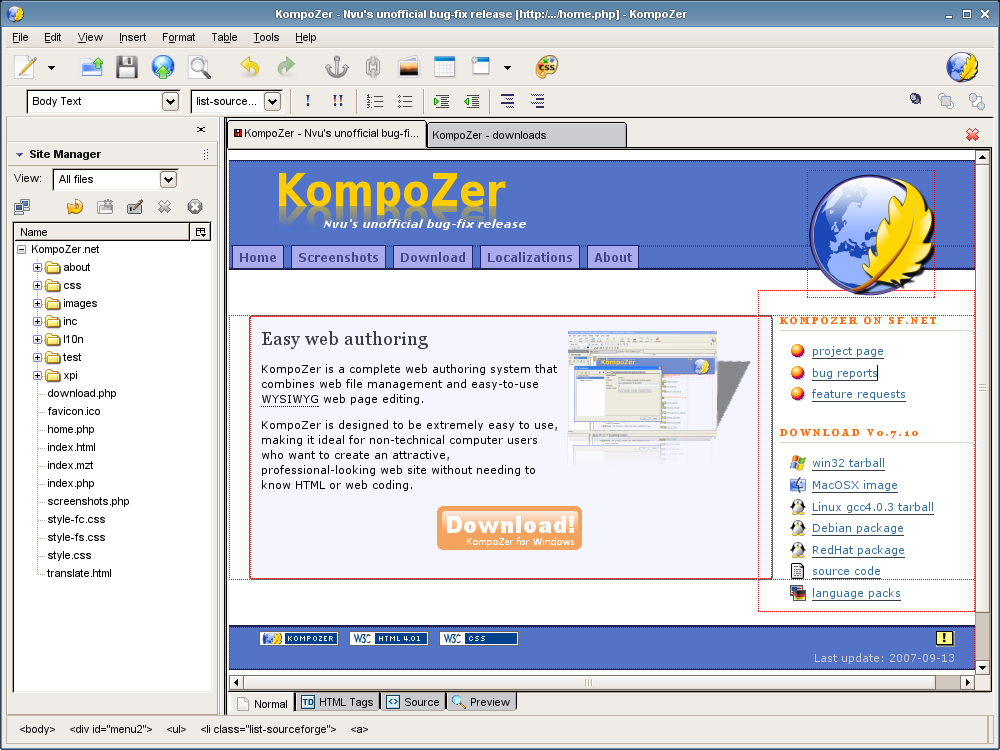
Several Cascading Style Sheets (CSS) tell the browser what a page should look like and are designed apart from putting pages together - they are truly modular. This was, in many ways, the final nail in the coffin for the awful Frontpage which Microsoft marched off into the sunset to be replaced by Expression Web but Dreamweaver marched into the future as the only sensible choice, though a few shareware and open source choices were catching up. In particular, one named NVU could manage - just about - the same tricks.

The Controller manages what the website does. Until recently, there were 4 main models for the Controller part of the design. Server-based software known as CGI or Common Gateway Interface can be called by the page and return information. Many pages use CGI, but years ago, Mozilla reasoned some could be software on the browser rather than the server. They added a feature known as Javascript which has become more or less universal. It was named to hitch a ride on the popularity of the use of applets written in Java - which is nothing whatever to do with Javascript. As usual, Microsoft had "philosophical objections" - sheer greed, the rest of us call it - and implemented their own version known as ActiveX objects.

Recently, a new technique has grown in popularity based on Asynchronous use of XML to pass data to a page, to be processed by Javascript. The initial letters give it its name, AJAX, which stands for Asynchronus Javascript and XML and it is the basis for "Web 2.0" pages. With older methods, it tends to be viewed as the be-all and end-all of the Controller, but nothing could be further from the truth!

Design Templates

Commentators forget it is design, not pages, that is modular. Dreamweaver, Frontpage, Expression Web and NVU all had page templates and still do. Often, they are treated as a pattern into which page content must somehow be squeezed. A good and effective use of templates has several elements which make the ideal design software and it is that I want to look at.

It allows - but does not insist on - the MVC model. It can use and edit Cascading Style Sheets for look and feel, link software for page functions and manage links and it carries the MVC model into every part of every page.

A good template tells you which bits can hold content and be edited. It tells you which bits can be repeated. It tells you which are optional. Finally, it tells you which are movable. Some may allow more, but these four are the main things a template should do. If we add those to our list of what a good web design tool must do, we come down to the same old faces - but which should you choose for your own use?

Software selection

There is no way to deny that up there in front is Dreamweaver, now owned by Adobe. It is without doubt the best in the field and should suit anyone with the need for design software and the money to pay for it. Unfortunately, it is a lot of money and for that reason I simply can't recommend it.

Internet ExplorerThankfully, despite the odd protestation from Microsoft sales staff, Frontpage is now not merely dead, but rotted in the ground. If you already have it, bury it! If you don't have it then please God do not buy it!

The same can't be said for Expression Web and to be Firefox page displayfrank it is worth looking at if you are prepared to spend the kind of money Adobe ask for. For myself, I looked at the advertising page with a browser that was not by Microsoft - in my case I used Firefox - and you can see the results in the pictures here.

It took seconds to realise any product which produces this sort of Microsoft-dependent crap is not worth the money.

My advice? Don't touch Expression Web with someone else's bargepole!

Rapidly bringing up the rear comes NVU - which may or may not be as dead as a doornail! This is a totally unacceptable way to choose design software and for that reason alone NVU should be completely discounted from the running, but fortunately it carried on as an Open Source project based on the original NVU and developed from there.

The replacement is called KompoZer and is effectively the latest version of the old software with all its benefits and fewer of its bugs. Together with its unbeatable price - absolutely FREE - it makes KompoZer the natural choice for non-professional designers.

Best of all, you can simply download a copy and try it out. If you don't like it, you lose nothing and still have your hard-earned money to spend on one of the alternatives.

Saturday, 19 April 2008

Doing Design

There's no point discussing design methods without explaining the plan - and notice that there is a plan! Never start a design without one.

For me, it was easy: readers told me what they wanted. Let's make no bones about this - you may think your ideas are good but you will never do better than listen to users. I had a short list of what people wanted.

  • To be "prettier"
  • To be able to add stuff
  • It should always work
  • To see new changes easily

Pretty it up

The first is probably the most common request and almost impossible to be sure of. Its rare for any two people to think changes make it better the same way.

I seriously considered using a genetic algorithm to make site changes depending on the way it is used, mainly because the new templates make it fairly easy. I even tested it before I realised that the big problem was the design would be the basis for the rest of the linked sites - and if it kept changing, the whole site would have to do the same.

As a second choice, I set up on-line polls with different design elements and asked people what they liked. I didn't ask about colour - I had decided to use colours based on our family crest. Of course, the snag with asking is that you might get answers you don't like.

And sure enough, I did!

Personally, I don't like boxes with round corners: but - by a two to one majority - users did! I also don't like separate boxes to one side of the screen: but users did, by an even larger majority. There were even ideas about what should go in each box and mostly I've stuck to them, even limiting the newsreel to genealogy in the UK, although to be perfectly frank I am not sure how much I trust Google's news filter.

Like it or not - and I still don't - I had a design plan, but users are a fickle lot, so I'll run a poll to check what you think and keep running it from time to time.

Add it up

The second was trickier - there are many ways to add to a website - but gave me the chance to use some of the experience I have.

First to consider was to use existing web space and add a database. That was a no-go since my provider is cagey about it unless you cough up a chunk of cash. I don't want to pay, so that I can avoid asking users to cover costs.

I was left with fewer free options than I liked, but one was to use a free web host.

Problems with free hosts are legion but I'll leave you to check those for yourselves - there are plenty of articles about it in the computer press. If you're happy with those - and many are, including myself - then fine.

I didn't feel it was right since I wanted control over membership and access. Frankly, it was too much like hard work! That left me one choice: a free wiki service. Part two of the plan was in place.

Keep it up

One of the first lessons I learned was not to ignore advice, so I make no apologies for using two writers for whom I have had a long and deep respect.

The first is Guy Kewney, best known to many because the BBC mistook this tall, thin, wiry, red-headed and (I hope he will not mind me mentioning) greying and balding middle-aged man and interviewed instead a young, large, and very much black person who knew damn all about computing!

The second is a man for whom I have the deepest respect - even though I've met and talked with him and found he is a lot funnier and less serious than his journalism would suggest. In the past, he used to be known as "Wavey Davey" but now seems to be known only as Dave Winder - and as yet I can't find a link to his web page, but will set one up when I do!

Both have been around the block and use different web pages to make sure their work is available. As far as I know, neither has come out publicly and said "for reliability, spread your pages across multiple websites", but it seems to be the best idea and is precisely what I chose to do.

This, then, is the third part of the plan: different services provided by different servers linked through a central page.

Feed it up

The last suggestion was to keep people informed about changes. This was the hard part and the decisive issue in choosing some of the other options. It can be hard to keep you informed and, to be frank, I didn't want the effort of doing it myself . This is, after all, a site to be used rather to take me a long time just to keep people up to date!

RSS, also called Really Simple Syndication (and, yes, I know there are other claims for what it means) was and is the obvious choice. Best of all, it leaves it up to you to choose how much, how often and in how much detail to be kept up to date. It even lets you choose which parts to be kept informed about!

This is a no-brainer. The fourth part of the plan was decided by being blindingly obvious!

Design summary

So the plan was now in place.

It would be split into parts, each dealing with one service.
Page design would be based on the blog.
Changes might be needed because of how other parts looked.

The first three parts would be a blog, a wiki and the central pages on my own server. I would design the blog and copy it to my own page. Then, set up a wiki with a similar design - and change mine to look similar to both. All I had to do now was find the right wiki and get working.

Except that at this point family members asked if I could include a forum where they could meet up and maybe a chat-room where they could talk.... I had not started and already the requirements were growing!

Monday, 31 March 2008

Onwards and Upwards

Site changes should roll out pretty quickly now. It is just a matter of collecting the parts together on the linking site.

That might sound strange, so let me explain.

Redesign time

The House of Preston is not one site but several, with common design and purpose - for members of the Preston family to share genealogy details, family records and so on.

When Blogger started Beta Testing for new designs, it was obvious I had to change the design since it had always been the basis for the look and feel.

In any case, the old one - and myself - had been getting messages making the same points :-
  • It was not pretty
  • There were no family records
  • Users couldn't add their own stuff
  • Tutorials in blog pages are not very good
It was one of those times when you look at what you have done and realise you have to do it all over again - but do it properly!

Mash-ups and mix-ups

The plan was to use several providers of features on offer out in Internet-land. At first, there weren't many, but along with the Blogger announcement came the real Web 2.0 sites.

The web was changing and we had to change with it!

Much more could be done. I had always been of the opinion that the web lost a lot when Tim Berners-Lee's original vision of a web you could edit as well as read had gone. The reasons why that vision disappeared are complex, but in a nutshell they come down to Netscape adding features to HTML and Microsoft following suit.

I wanted that vision back - and to judge from the comments I had received, so did you!

Thats what Web 2.0 offered - a simple design could be used for many pages and you, the reader, could change what was on it. Sites with a mix of features like this are called "mash-ups" but here I planned to use different sites for more reliability and ease of use - a "mix-up" rather than mash-up. At the time, I was swamped with things to do, but I set up a basic design on Blogger and looked for other services to deal with suggestions from users.

And they all had to work with the same basic design.

Family records

First up was some way to add family records and make sure readers could post to them. It screamed out that it had to be a wiki.

It took a lot of doing to find something I could use without having to run my own server. In the end, I collected a list of wiki services and tried them all out. It came down to two I liked - PBwiki and Wikispaces. Neither could do what I needed, but I could plan how family records should be stored.

Both reached the needed level of personal design at the end of last, start of this year.

Putting it together

With the wiki sites and Blogger's update, it was time to work on the design. Of course, that could change the way the blog and wikis should look, so it had to be right.

Its worth looking at the development, since it could help people building their own sites. There are limits to one blog posting though, so let's leave that to another time.

We have a simple design thats slightly different for different features. Its still based on static pages with links to more capable sites, but is a big step towards what I think the web should be like - and to what I had been asked for. You should be able to recognise where you are from the look and feel of the page.

But since the old version wasn't pretty, I have to ask - is this better?

You'll find a poll to the right. Please vote on what you think - but remember the design is different on parts of the site. You might want to wait until the whole site is updated before voting.

After all, a major objective is your freedom - so it is up to you.